Getting Started
These APIs are designed for reliability in real-world payment and order flows. Before integrating, it’s important to understand the core concepts that govern how orders, amounts, authentication, and errors are handled.
Most integration issues arise not from API usage, but from misunderstanding lifecycle rules, idempotency, or error handling. Reading this section will help you build a robust integration that is safe to retry, easy to reconcile, and production-ready.
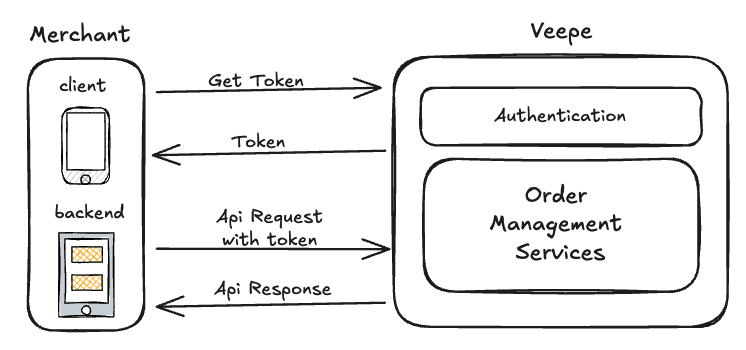
High-level architecture showing merchant integration
Order Lifecycle
Every order progresses through a carefully defined lifecycle, moving from creation to completion. At each stage, only specific, valid state transitions are permitted to ensure consistency, prevent errors, and maintain accurate tracking of order status.
| Status | Allowed Next Statuses | Description |
|---|---|---|
| OPEN | CONFIRMED, CANCELLED, FAILED | Order is created and editable; can be confirmed, cancelled, or fail due to payment/system issues |
| CONFIRMED | PROCESSING, CANCELLED | Order is confirmed and locked; ready for processing |
| PROCESSING | SHIPPED, CANCELLED | Order is being processed; preparation or payment completion happening |
| SHIPPED | DELIVERED, CANCELLED | Order has been shipped to the customer; can still be cancelled in rare cases |
| DELIVERED | REFUNDED, CLOSED | Order delivered to customer; may require refund or closure |
| CANCELLED | REFUNDED, CLOSED | Order cancelled; refund may be issued, then closed |
| FAILED | CLOSED | Order failed due to payment or system issues; cannot progress further |
| REFUNDED | CLOSED | Order amount refunded to customer; next step is closing the order |
| CLOSED | - | Order lifecycle complete; terminal state |
- Only OPEN orders can be updated
- Invalid transitions return 409 CONFLICT
- CANCELLED, FAILED, CLOSED are terminal states
Checkout Page
The checkout page is a hosted, shareable payment page generated for a specific order and checkout session. It allows customers to complete payment by selecting from the payment gateways enabled by the merchant, while ensuring secure payment tracking, retries, and reconciliation against the order.
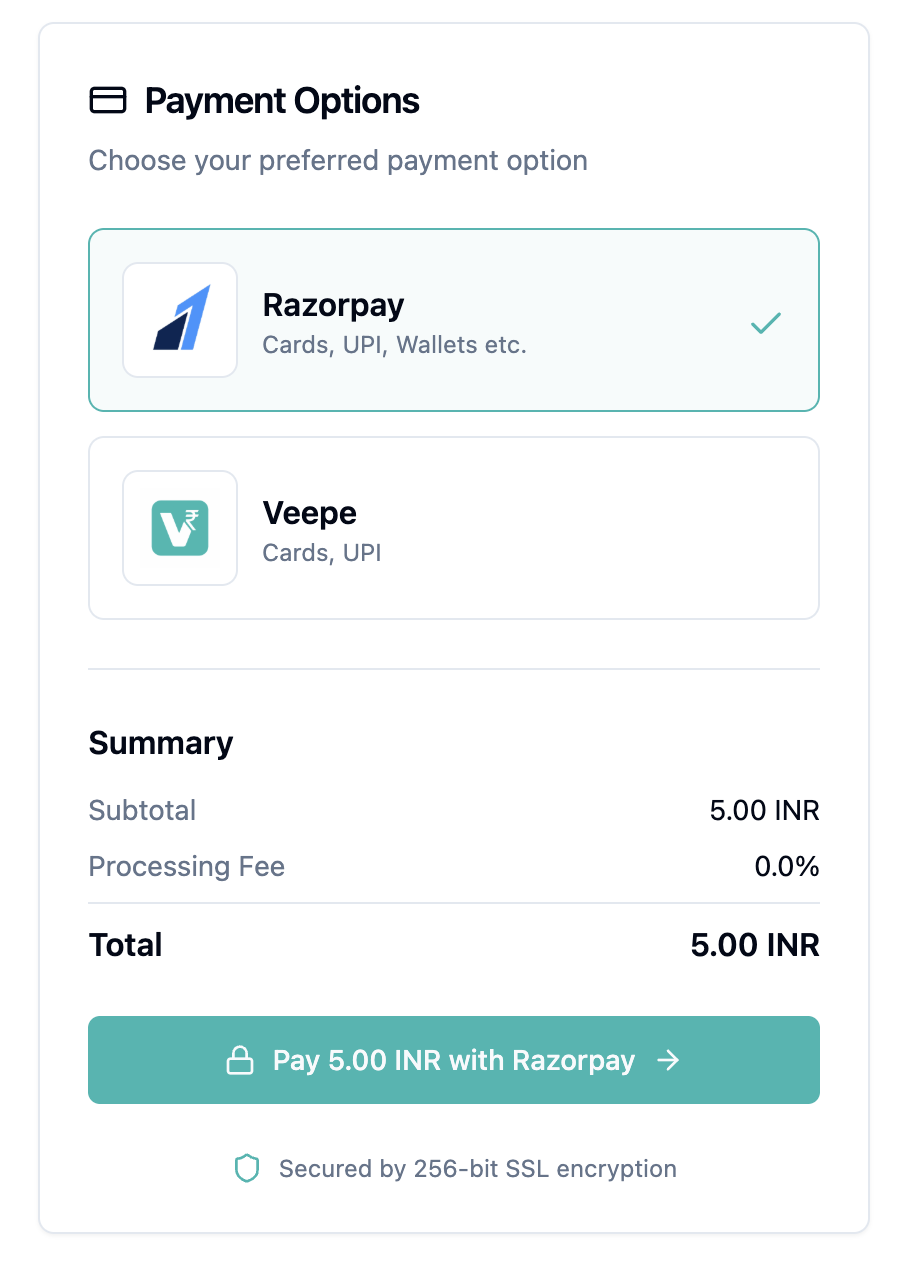
Hosted checkout page where customers select a payment gateway to complete payment
A checkout session is created for an order to initiate the payment process. Each session generates a unique checkout page URL that can be shared with the merchant’s customer to complete the payment.
{"sessionId": "vrFss1OtqVyAH3kmgeLry6PX","orderId": "7b719e75-b235-4ffb-8130-efcae8f6bd90","checkoutPageUrl": "https://<CHECKOUT_PAYMENT_LINK>"}
| Aspect | Description |
|---|---|
| Session Binding | Each checkout page is bound to a unique sessionId and orderId to ensure accurate payment attribution |
| Shareable URL | The checkoutPageUrl can be shared directly with the customer without authentication |
| Amount & Currency | Amount and currency are derived from the order and cannot be modified on the checkout page |
| Multiple Payment Attempts | Customers may retry payment using the same or different enabled gateways until the order is paid or closed |
| Order Mapping | All payment attempts from the checkout page are recorded against the same order |
- The checkout page displays all payment gateways enabled for the merchant such as Razorpay, Cashfree, or Veepe
- Customers can select one of the available gateways to proceed with payment
- Only gateways that are properly onboarded and configured are shown
- If a gateway is disabled or misconfigured, it will not appear on the checkout page
- Merchants must onboard separately with each payment gateway they wish to use
- Required credentials such as API keys and secrets must be provided to the platform admin
- Gateways are enabled only after credentials are verified and activated
- For payment gateway onboarding or configuration assistance, contact support@veepe.in
The checkout page UI presents an order summary, payable amount, and a list of enabled payment gateways, providing a simple and secure payment experience for the customer.
Amount & Currency Handling
All monetary values use minor currency units.
| Currency | Minor Unit |
|---|---|
| INR | 1 INR = 100 paise |
| USD | 1 USD = 100 cents |
{"amount": {"currency": "INR","value": 150000}}
- Always send amounts in minor units
- Floating point values are not allowed
- Currency must be ISO 4217 compliant
Idempotency & Merchant References
Idempotency ensures that repeated or retried requests—whether due to network issues, client errors, or server timeouts—do not result in duplicate orders being created. By providing a unique merchant-defined reference for each request, the system can safely recognize and ignore repeated submissions, guaranteeing that each order is processed exactly once. This mechanism is crucial for maintaining consistency, avoiding double charges, and ensuring reliable reconciliation between the merchant and our payment platform.
- merchantOrderReference must be unique per merchant
- Length must be between 3–50 characters
- Duplicate references return the existing order
Key Generation & Authentication
All API access is secured using OAuth2-based authentication. Each merchant is issued unique credentials that are used to obtain access tokens. These tokens authenticate every request and ensure secure, scoped access to platform resources.
Before making any API calls, merchants must obtain a client ID and client secret. These credentials uniquely identify the merchant and are required to generate OAuth2 access tokens. Credential generation is handled by the platform support team during merchant onboarding.
- Request client credentials by contacting support at support@veepe.in or via an official onboarding call
- Support will generate and share a client ID and client secret for the merchant
- These credentials are used exclusively for server-to-server authentication
- Client secrets must be stored securely and never exposed in frontend applications
Once issued, the client credentials can be exchanged for an access token. Access tokens are JWT (JSON Web Token) based, digitally signed tokens that carry authentication and authorization information. Each API request must include a valid access token in the Authorization header.
Authorization: Bearer <access_token>
JWT access tokens contain standard claims such as issuer, subject, issued-at time, expiry time, and scopes. These claims allow the platform to validate the authenticity of the request, identify the merchant, and enforce permissions without additional database lookups.
- Access tokens are time-bound and automatically expire after a configured duration
- Expired or invalid tokens result in a 401 Unauthorized response
- Tokens should be cached and reused until expiry to avoid unnecessary token requests
To support long-running integrations, refresh tokens may be issued alongside access tokens. Refresh tokens are used to obtain a new access token without re-authenticating using client credentials. This helps maintain uninterrupted access while limiting the lifetime of access tokens for security.
- Refresh tokens have a longer lifespan than access tokens
- Refresh tokens should be stored securely and treated as sensitive credentials
- If a refresh token is compromised, it should be revoked immediately
For security reasons, the platform may rotate credentials or invalidate tokens. Merchants should design integrations to gracefully handle authentication failures and automatically retry token generation when required.
API Authentication
Every API endpoint provided by this platform mandates authentication via the OAuth2 protocol. To successfully access any resource, clients must include a valid access token with each request, ensuring that only authorized applications and users can interact with the APIs.
Authorization: Bearer <access_token>
- Tokens are JWT-based
- Tokens expire based on expires_in
- Expired or invalid tokens return 401
Error Handling
All APIs return errors in a consistent format.
{"errorCode": 1006,"errorMessage": "Token is not valid or has expired"}
| HTTP | errorCode | Description |
|---|---|---|
| 400 | INVALID_REQUEST | Validation failed |
| 401 | UNAUTHORIZED | Invalid or expired token |
| 404 | NOT_FOUND | Resource not found |
| 409 | CONFLICT | Invalid state or duplicate request |
| 500 | INTERNAL_ERROR | Server error |
/tokenGenerate Access Token
Generates an OAuth2 access token using client credentials. This token is required to authenticate and authorize subsequent API requests on behalf of the merchant.
Request Headers
| Field | Type | Description |
|---|---|---|
Content-Type | string | Request payload format. Must be application/json. |
Request Body
| Field | Type | Description |
|---|---|---|
grantType | string | OAuth2 grant type. Must be set to client_credentials. |
clientId | string | Unique client identifier issued to the merchant during onboarding. |
clientSecret | string | Confidential client secret associated with the clientId. Must be kept secure. |
{"grantType": "client_credentials","clientId": "85ede33f-c1e7-441c-a1f3-b924cf158c13","clientSecret": "NHK1GNSM2Vdq6FZIgMc9TEGWquog8c1x"}
Response Fields
| Field | Type | Description |
|---|---|---|
access_token | string | JWT access token used for authenticating API requests. |
token_type | string | Type of token issued. Typically Bearer. |
expires_in | number | Token validity duration in seconds. |
scope | string | Scopes granted to the access token. |
{"access_token": "eyJhbGciOiJSUzI1NiIsInR5cCI6IkpXVCJ9...","token_type": "Bearer","expires_in": 3600,"scope": "openid profile email"}
Code Examples
curl -X POST https://api.veepe.in/v1/token -H "Content-Type: application/json" -d '{"grantType": "client_credentials","clientId": "your-client-id","clientSecret": "your-client-secret"}'
/ordersCreate Order
Creates a new order for the authenticated merchant by validating order metadata, customer details, item breakdown, and total amount. Once validated, the platform persists the order in an OPEN state, generates a unique internal orderId used across payments, refunds, and settlements, and assigns a human-readable displayOrderId for merchant dashboards, customer communication, and operational support.
Request Headers
| Field | Type | Description |
|---|---|---|
Content-Type | string | Request payload format. Must be application/json. |
Authorization | string | Bearer Authorization header i.e. Bearer <access_token>, the same token which got generated using /token endpoint |
Request Body
| Field | Type | Description |
|---|---|---|
orderType | string | Type of order. values: SALE, PURCHASE |
channel | string | Order source channel. values: APP, ECOMM, WEB |
merchantOrderReference | string | Merchant-side unique reference for idempotency and reconciliation. Merchant Order Reference must have at least 3 and max 50 characters. |
amount.currency | string | ISO currency code. Example: INR. |
amount.value | number | Total order amount in minor currency units. i.e. 1Rs = 100Paise |
customer.name | string | Full name of the customer. |
customer.email | string | Email address of the customer. |
customer.phone | string | Customer phone number including country code. |
customer.address.street | string | Street address of the customer. |
customer.address.city | string | City of the customer address. |
customer.address.state | string | State of the customer address. |
customer.address.postalCode | string | Postal or ZIP code. |
customer.address.country | string | Three letter country code of the address. |
orderDetails.items[].name | string | Name or description of the item (Product). |
orderDetails.items[].quantity | number | Quantity of the Product ordered. |
orderDetails.items[].unitPrice | number | Unit price per item in minor currency units. |
orderDetails.metadata.<anyKey> | string | Optional delivery or order notes. i.e. note, delivery instructions etc |
{"orderType": "SALE","channel": "APP","merchantOrderReference": "633876923","amount": {"currency": "INR","value": 500},"customer": {"name": "Vikas Pandey","email": "vikas.pandey.customer@example.com","phone": "+919876543210","address": {"street": "456 Civil Lines","city": "Raipur","state": "Chhattisgarh","postalCode": "492001","country": "IND"}},"orderDetails": {"items": [{"name": "Fast Charge USB-C Cable (1m)","quantity": 1,"unitPrice": 250},{"name": "Mini LED Desk Lamp (USB Powered)","quantity": 1,"unitPrice": 250}],"metadata": {"note": "Deliver between 9 AM and 5 PM on weekdays only","source": "mobile_app","promoCode": "SUMMERSALE20"}}}
Response Fields
| Field | Type | Description |
|---|---|---|
displayOrderId | string | Human-readable order identifier. |
orderId | string | System-generated unique order ID. |
orderType | string | Type of order such as SALE. |
channel | string | Order origin channel. |
orderDate | string | ISO-8601 timestamp of order creation. |
merchantOrderReference | string | Merchant-provided reference ID. |
amount.value | number | Final order amount value. |
amount.currency | string | Currency of the order amount. |
orderStatus | string | Current order status. Example: OPEN |
customer.name | string | Customer name. |
customer.email | string | Customer email address. |
customer.phone | string | Customer phone number. |
customer.address.street | string | Street address. |
customer.address.city | string | City. |
customer.address.state | string | State. |
customer.address.postalCode | string | Postal code. |
customer.address.country | string | Country code. |
orderDetails.items[].name | string | Item name. |
orderDetails.items[].quantity | number | Item quantity. |
orderDetails.items[].unitPrice | number | Item unit price. |
orderDetails.metadata.<anyKey> | string | Optional metadata |
{"displayOrderId": "ORD-814350-ZW","orderId": "3ea8e4e0-d82a-4e65-8407-c19f1a338732","orderType": "SALE","channel": "APP","merchantOrderReference": "633876923","amount": {"value": 500,"currency": "INR"},"orderStatus": "OPEN","customer": {"name": "Vikas Pandey","email": "vikas.pandey.customer@example.com","phone": "+919876543210","address": {"street": "456 Civil Lines","city": "Raipur","state": "Chhattisgarh","postalCode": "492001","country": "IND"}},"orderDetails": {"items": [{"name": "Fast Charge USB-C Cable (1m)","quantity": 1,"unitPrice": 250},{"name": "Mini LED Desk Lamp (USB Powered)","quantity": 1,"unitPrice": 250}],"metadata": {"note": "Deliver between 9 AM and 5 PM on weekdays only","source": "mobile_app"}},"orderDate": "2026-01-15T18:19:51.318977886Z"}
Code Examples
curl -X POST https://api.veepe.in/v1/orders -H "Content-Type: application/json" -H "Authorization: Bearer <access_token>" -d '{"orderType": "SALE","channel": "APP","merchantOrderReference": "633876923","amount": { "currency": "INR", "value": 500 },"customer": {"name": "Vikas Pandey","email": "vikas@example.com","phone": "+919876543210"}}'
/ordersGet Orders
This API fetches a paginated list of orders associated with the authenticated merchant. It returns summary details for each order, including order ID, amount, status, customer information, and timestamps. Pagination parameters such as page number and page size can be used to control the result set. This endpoint is useful for listing, filtering, and managing orders efficiently.
Request Headers
| Field | Type | Description |
|---|---|---|
Authorization | string | Bearer access token. |
Response Fields
| Field | Type | Description |
|---|---|---|
data | array | List of merchant orders. (see the example for more details) |
totalRecords | number | total number of orders |
totalPages | number | total pages available |
page | number | Current page number. |
{"totalRecords": "84","totalPages": "9","page": "1","data": [{"displayOrderId": "ORD-119123-VX","orderId": "6d8bf86d-3758-45ae-ad67-0f682ba64f63","channel": "ECOMM","merchantId": "85ede33f-c1e7-441c-a1f3-b924cf158c13","orderDate": "2026-01-07T17:42:03.706Z","merchantOrderReference": "6338769","orderAmount": {"value": 8000,"currency": "INR"},"orderStatus": "OPEN","customer": {"name": "Vikas","email": "Vikas.pandey@optivest.com","phone": "+1234567890","address": {"street": "123 Main St","city": "New York","state": "NY","postalCode": "10001","country": "IND"}},"orderDetails": {"items": [{"name": "Product A","quantity": 2,"unitPrice": 2000},{"name": "Product B","quantity": 1,"unitPrice": 4000}],"metadata": {"note": "Deliver between 9 AM and 5 PM","source": "mobile_app"}}}]}
Code Examples
curl -X GET "https://api.veepe.in/v1/orders?page=1" -H "Authorization: Bearer <access_token>"
/orders/{orderId}Get Order
This API retrieves comprehensive information for a specific order identified by its order ID. The response includes order amount, customer details (name, email, phone, and address), order items with quantity and unit price, metadata, and timestamps. It provides a complete snapshot of the order for tracking, auditing, or display purposes.
Request Parameters
| Field | Type | Description |
|---|---|---|
orderId | string | the UUID generated by the system as orderId, api does not support displayOrderId |
Request Headers
| Field | Type | Description |
|---|---|---|
Authorization | string | Bearer access token. |
Response Fields
| Field | Type | Description |
|---|---|---|
displayOrderId | string | Human-readable order ID. |
orderId | string | Unique internal order identifier. |
channel | string | Channel from which the order was placed. |
merchantId | string | Unique merchant identifier. |
orderDate | string | ISO8601 timestamp when the order was created. |
merchantOrderReference | string | Merchant's reference for the order. |
orderAmount.value | number | Total order amount value. |
orderAmount.currency | string | Currency code (ISO 4217). |
orderStatus | string | Current status of the order. |
customer.name | string | Customer name. |
customer.email | string | Customer email. |
customer.phone | string | Customer phone number. |
customer.address.street | string | Street address. |
customer.address.city | string | City. |
customer.address.state | string | State. |
customer.address.postalCode | string | Postal code. |
customer.address.country | string | Country code. |
orderDetails.items[].name | string | Item name. |
orderDetails.items[].quantity | number | Quantity of the item. |
orderDetails.items[].unitPrice | number | Unit price of the item. |
orderDetails.metadata.note | string | Delivery note. |
orderDetails.metadata.source | string | Source of the order (e.g., mobile_app). |
orderStatusEvents[].eventName | string | Event name when status of the order is updated |
orderStatusEvents[].payload.createdAt | string | Timestamp of the event. |
orderStatusEvents[].payload.orderStatus | string | Status at this event. |
orderStatusEvents[].payload.orderStatusComment | string | Optional comment for status change. |
{"displayOrderId": "ORD-119123-VX","orderId": "6d8bf86d-3758-45ae-ad67-0f682ba64f63","channel": "ECOMM","merchantId": "85ede33f-c1e7-441c-a1f3-b924cf158c13","orderDate": "2026-01-07T17:42:03.706Z","merchantOrderReference": "6338769","orderAmount": {"value": 8000,"currency": "INR"},"orderStatus": "CONFIRMED","customer": {"name": "Vikas","email": "Vikas.pandey@optivest.com","phone": "+1234567890","address": {"street": "123 Main St","city": "New York","state": "NY","postalCode": "10001","country": "IND"}},"orderDetails": {"items": [{"name": "Product A","quantity": 2,"unitPrice": 2000},{"name": "Product B","quantity": 1,"unitPrice": 4000}],"metadata": {"note": "Deliver between 9 AM and 5 PM","source": "mobile_app"}},"orderStatusEvents": [{"eventName": "ORDER_STATUS_UPDATED","payload": {"createdAt": "2026-01-08T10:03:47.666786093Z","orderStatus": "CONFIRMED","orderStatusComment": "Order CONFIRMED"}}]}
Code Examples
curl -X GET https://api.veepe.in/v1/orders/{orderId} -H "Authorization: Bearer <access_token>"
/orders/{orderId}Update Order
This API allows updating an existing order that is currently in the OPEN state. You can modify the total order amount, update customer information (such as name, email, phone, or address), or change the order items, including their quantity, unit price, or associated metadata. The API ensures that only orders in the OPEN state can be updated
Request Headers
| Field | Type | Description |
|---|---|---|
Authorization | string | Bearer access token. |
Content-Type | string | application/json. |
Request Body
| Field | Type | Description |
|---|---|---|
amount.value | number | order amount value. |
amount.currency | string | Currency code (ISO 4217). |
customer.name | string | Customer name. |
customer.email | string | Customer email. |
customer.phone | string | Customer phone number. |
customer.address.street | string | Street address. |
customer.address.city | string | City. |
customer.address.state | string | State. |
customer.address.postalCode | string | Postal code. |
customer.address.country | string | Country code. |
orderDetails.items[].name | string | Item name. |
orderDetails.items[].quantity | number | Quantity of the item. |
orderDetails.items[].unitPrice | number | Unit price of the item. |
orderDetails.metadata.note | string | Delivery note. |
orderDetails.metadata.source | string | Source of the order (e.g., mobile_app). |
{"amount": {"currency": "INR","value": 200},"customer": {"name": "Vaidik Pandey","email": "Vaidik.pandey.customer@example.com","phone": "+919876543210","address": {"street": "456 Civil Lines","city": "Raipur","state": "Chhattisgarh","postalCode": "492001","country": "IND"}},"orderDetails": {"items": [{"name": "Product A","quantity": 1,"unitPrice": 200}],"metadata": {"note": "Deliver between 9 AM and 5 PM asdasd ada d","source": "app"}}}
Response Fields
| Field | Type | Description |
|---|---|---|
success | boolean | Update status. |
{"success": true}
Code Examples
curl -X PUT https://api.veepe.in/v1/orders/{orderId} -H "Content-Type: application/json" -H "Authorization: Bearer <access_token>" -d '{"customer": {"name": "Updated Name","email": "updated@example.com"}}'
/orders/{orderId}/statusUpdate Order Status
This API updates the lifecycle status of a specific order. It allows changing the order’s current state (e.g., from OPEN to CONFIRMED, CANCELLED, or COMPLETED) based on business rules. Only valid state transitions are permitted, and attempts to update orders in an incompatible state will result in an error. This endpoint is essential for managing order progress, tracking fulfillment, and maintaining accurate order records, allowed Order status are OPEN, CONFIRMED, PROCESSING, SHIPPED, DELIVERED, CANCELLED, REFUNDED, FAILED, CLOSED;
Request Headers
| Field | Type | Description |
|---|---|---|
Content-Type | string | application/json. |
Authorization | string | Bearer access token. |
Request Body
| Field | Type | Description |
|---|---|---|
orderStatus | string | New order status. |
note | string | status note. |
{"orderStatus": "CONFIRMED","note": "this order is available in inventory so confirm it"}
Response Fields
| Field | Type | Description |
|---|---|---|
success | boolean | Updated status. |
{"success": "true"}
Code Examples
curl -X PUT https://api.veepe.in/v1/orders/{orderId}/status -H "Content-Type: application/json" -H "Authorization: Bearer <access_token>" -d '{"orderStatus": "CONFIRMED"}'
/orders/{orderId}/checkout-linkCreate Checkout Link
Generates a hosted checkout link for an existing OPEN order. The checkout link can be shared with the customer to complete payment using supported payment methods such as UPI, Cards, or NetBanking. The order must already exist and be in a payable state. No new order or payment intent is created at this step.
Request Headers
| Field | Type | Description |
|---|---|---|
Authorization | string | Bearer Authorization header. Example: Bearer <access_token> generated via the /token endpoint. |
Response Fields
| Field | Type | Description |
|---|---|---|
sessionId | string | Unique identifier for the generated checkout link. |
checkoutPageUrl | string | Hosted payment page URL that can be shared with the customer. |
orderId | string | Associated orderId for which the checkout link was generated. |
expiresAt | string | ISO-8601 timestamp indicating when the checkout link expires, if applicable. |
createdAt | string | ISO-8601 timestamp of checkout link creation. |
{"sessionId": "chk_9f1c2e8b4d","orderId": "7b719e75-b235-4ffb-8130-efcae8f6bd90","checkoutPageUrl": "https://<CHECKOUT_PAGE_URL>","createdAt": "2026-01-15T18:25:12.441Z","expiresAt": "2026-01-16T18:25:12.441Z"}
Code Examples
curl -X POST https://api.veepe.in/v1/orders/{orderId}/checkout-link -H "Content-Type: application/json" -H "Authorization: Bearer <access_token>" -d '{"redirectUrl": "https://yoursite.com/payment-complete","callbackUrl": "https://yoursite.com/api/webhook"}'
/orders/{orderId}/checkout-linkGet Checkout page
Fetches the hosted checkout details for an existing order. This endpoint returns the checkout session associated with the order, including the hosted checkout page URL that can be shared with the customer to complete payment. If no checkout session exists, the platform may create one implicitly or return an error based on configuration.
Request Headers
| Field | Type | Description |
|---|---|---|
Authorization | string | Bearer Authorization header i.e. Bearer <access_token>, the same token which got generated using /token endpoint |
Response Fields
| Field | Type | Description |
|---|---|---|
sessionId | string | Unique identifier for the generated checkout link. |
checkoutPageUrl | string | Hosted payment page URL that can be shared with the customer. |
orderId | string | Associated orderId for which the checkout link was generated. |
expiresAt | string | ISO-8601 timestamp indicating when the checkout link expires, if applicable. |
createdAt | string | ISO-8601 timestamp of checkout link creation. |
{"sessionId": "chk_9f1c2e8b4d","orderId": "7b719e75-b235-4ffb-8130-efcae8f6bd90","checkoutPageUrl": "https://<CHECKOUT_PAGE_URL>","createdAt": "2026-01-15T18:25:12.441Z","expiresAt": "2026-01-16T18:25:12.441Z"}
Code Examples
curl -X GET https://api.veepe.in/v1/orders/{orderId}/checkout-link -H "Authorization: Bearer <access_token>"
/reportsGenerate Report
This API generates a PDF report of orders within a specified time range. The report includes detailed order information such as order ID, customer details, order amount, status, items, and timestamps. Users can specify the start and end dates to filter orders. The generated PDF is formatted for easy viewing, printing, and sharing, making it suitable for business reporting, audits, and management review
Request Headers
| Field | Type | Description |
|---|---|---|
Authorization | string | Bearer access token. |
Content-Type | string | application/json. |
Request Body
| Field | Type | Description |
|---|---|---|
type | string | Report type. i.e. ORDER_REPORT |
startTimestamp | string | Start timestamp in ms. |
endTimestamp | string | End timestamp in ms. |
{"type": "ORDER_REPORT","startTimestamp": "1751932800000","endTimestamp": "1754428799000"}
Response Fields
| Field | Type | Description |
|---|---|---|
reportId | string | Unique identifier for the generated report. |
type | string | Type of the report (e.g., Orders, Payments). |
status | string | Current status of the report generation (e.g., PENDING, COMPLETED). |
message | string | Optional message or error details related to report generation. |
downloadLink | string | URL to download the generated PDF report once ready. |
createdAt | string | Timestamp when the report was created (ISO 8601 format). |
{"reportId": "ab03a1b5-1179-4a68-9062-1921ffb01ae8","type": "TRANSACTIONS_REPORT","status": "PENDING","message": "Report generation request accepted","downloadLink": null,"createdAt": "2026-01-08T11:16:46.371131587Z"}
Code Examples
curl -X POST https://api.veepe.in/v1/reports -H "Content-Type: application/json" -H "Authorization: Bearer <access_token>" -d '{"reportType": "TRANSACTION_SUMMARY","startDate": "2026-01-01","endDate": "2026-01-31"}'
/reportsGet Reports
This API retrieves a paginated list of all reports generated for the authenticated merchant. Each report includes details such as report ID, type, generation status, optional messages, download link (if ready), and creation timestamp. Pagination parameters allow efficient browsing through large numbers of reports.
Request Parameters
| Field | Type | Description |
|---|---|---|
page | number | Page number to retrieve (default is 1). |
Request Headers
| Field | Type | Description |
|---|---|---|
Authorization | string | Bearer access token. |
Content-Type | string | application/json. |
Response Fields
| Field | Type | Description |
|---|---|---|
totalRecords | string | Total number of reports available. |
totalPages | string | Total number of pages available based on page size. |
page | string | Current page number returned. |
data[].reportId | string | Unique identifier for the generated report. |
data[].type | string | Type of the report (e.g., ORDER_REPORT, TRANSACTIONS_REPORT). |
data[].status | string | Current status of report generation (e.g., PENDING, COMPLETED, FAILED). |
data[].message | string | Optional message or error details related to report generation. |
data[].downloadLink | string | URL to download the PDF report once ready. Null if pending or failed. |
data[].createdAt | string | Timestamp when the report was created (ISO 8601 format). |
{"totalRecords": "2","totalPages": "1","page": "1","data": [{"reportId": "ab03a1b5-1179-4a68-9062-1921ffb01ae8","type": "TRANSACTIONS_REPORT","status": "COMPLETED","message": null,"downloadLink": "https://someurl/ab03a1b5-1179-4a68-9062-1921ffb01ae8.pdf","createdAt": "2026-01-08T11:16:46.371Z"},{"reportId": "7b84e590-1640-403c-9cb3-e5094f76e8a7","type": "TRANSACTIONS_REPORT","status": "COMPLETED","message": null,"downloadLink": "https://someurl/7b84e590-1640-403c-9cb3-e5094f76e8a7.pdf","createdAt": "2025-10-03T07:48:31.016Z"}]}
Code Examples
curl -X GET "https://api.veepe.in/v1/reports?page=1" -H "Authorization: Bearer <access_token>"
/reports/{reportId}Get Report
This API retrieves the status and details of a previously requested report using its unique report ID. It returns information such as report type, current generation status, optional messages, download link (if the report is ready), and creation timestamp. Useful for tracking report progress and downloading completed PDF reports.
Request Parameters
| Field | Type | Description |
|---|---|---|
reportId | string | Unique identifier of the report to retrieve. |
Request Headers
| Field | Type | Description |
|---|---|---|
Authorization | string | Bearer access token. |
Content-Type | string | application/json. |
Response Fields
| Field | Type | Description |
|---|---|---|
reportId | string | Unique identifier for the generated report. |
type | string | Type of the report (e.g., ORDER_REPORT, TRANSACTIONS_REPORT). |
status | string | Current status of the report generation (e.g., PENDING, COMPLETED, FAILED). |
message | string | Optional message or error details related to report generation. |
downloadLink | string | URL to download the generated PDF report once ready. Null if the report is still pending or failed. |
createdAt | string | Timestamp when the report was created (ISO 8601 format). |
{"reportId": "ab03a1b5-1179-4a68-9062-1921ffb01ae8","type": "ORDER_REPORT","status": "COMPLETED","message": "Report generated successfully","downloadLink": "https://example.com/reports/ab03a1b5-1179-4a68-9062-1921ffb01ae8.pdf","createdAt": "2026-01-08T11:16:46.371131587Z"}
Code Examples
curl -X GET https://api.veepe.in/v1/reports/{reportId} -H "Authorization: Bearer <access_token>"
/orders/{orderId}/invoiceCreate Invoice
This API generates an invoice for a specific order identified by its order ID. The invoice includes order details, customer information, itemized charges, taxes, and the total payable amount. The generated invoice is provided as a downloadable PDF, suitable for billing, record-keeping, and sharing with customers
Request Parameters
| Field | Type | Description |
|---|---|---|
orderId | string | Unique identifier of the order |
Request Headers
| Field | Type | Description |
|---|---|---|
Authorization | string | Bearer access token. |
Response Fields
| Field | Type | Description |
|---|---|---|
orderId | string | OrderId of invoice |
invoiceId | string | Generated invoice ID. Unique identifier of the invoice |
createdDate | string | Generated invoice datetime. |
{"orderId": "c8826e17-51a0-4f91-bfce-2182deeb8abb","invoiceId": "49de56b1-22b8-41ec-9945-668085295e3e","createdDate": "2026-01-08T11:44:31.277598511Z"}
Code Examples
curl -X POST https://api.veepe.in/v1/orders/{orderId}/invoice -H "Content-Type: application/json" -H "Authorization: Bearer <access_token>" -d '{"invoiceType": "STANDARD","dueDate": "2026-02-15"}'
/orders/{orderId}/invoice/{invoiceId}Get Invoice
This API retrieves the invoice for a specific order and returns a downloadable PDF link. The response includes invoice metadata, status, and a secure URL to download the invoice for billing, record-keeping, and sharing purposes.
Request Parameters
| Field | Type | Description |
|---|---|---|
orderId | string | Unique identifier of the order |
invoiceId | string | Unique identifier of the invoice |
Request Headers
| Field | Type | Description |
|---|---|---|
Authorization | string | Bearer access token. |
Response Fields
| Field | Type | Description |
|---|---|---|
orderId | string | Unique identifier of the order associated with the invoice. |
invoiceId | string | Internal or system-generated URL referencing the invoice. |
merchantId | string | Unique identifier of the merchant who issued the invoice. |
merchantName | string | Registered name of the merchant issuing the invoice. |
status | string | Current status of the invoice (e.g., GENERATED, PAID, CANCELLED). |
downloadLink | string | Secure URL to download the invoice PDF. |
createdDate | string | Timestamp when the invoice was generated (ISO 8601 format). |
updatedAt | string | Timestamp when the invoice was last updated (ISO 8601 format). |
{"orderId": "c8826e17-51a0-4f91-bfce-2182deeb8abb","invoiceId": "49de56b1-22b8-41ec-9945-668085295e3e","createdDate": "2026-01-08T11:44:31.277Z","merchantId": "85ede33f-c1e7-441c-a1f3-b924cf158c13","merchantName": "Amazon Ind Pvt ltd","status": "COMPLETED","updatedAt": "2026-01-08T11:44:38.328Z","downloadLink": "https://someurl/c8826e17-51a0-4f91-bfce-2182deeb8abb.pdf"}
Code Examples
curl -X GET https://api.veepe.in/v1/orders/{orderId}/invoice/{invoiceId} -H "Authorization: Bearer <access_token>"